When someone nearby searches “dentist near me” or “CA office in Kothrud”, Google shows a map with a handful of businesses at the top. Those few spots win a large share of calls, direction requests and walk-ins. This post explains the logic behind that ranking and the profile set-up every business needs on Google Business Profile (still widely called GMB, Google My Business), so you can improve your Google Business Profile ranking in a structured way.
The most important point first: reaching the top of local results is not luck, and it is not a secret trick. It is a system. Google has publicly explained how local ranking works, and once you understand it, the work becomes a weekly routine rather than a guessing game.
How does Google decide local rankings?
Google states that local results are based mainly on three factors: relevance, distance and prominence. Every practical step in this post supports one of these three pillars.
1. Relevance: do you match what was searched?
Relevance is how well your profile matches the search. If someone searches “child specialist” and your profile clearly says paediatric clinic, with the right category, services and description, Google can confidently show you. A vague or incomplete profile makes that harder.
2. Distance: how close are you to the searcher?
Distance is how far your business is from the searcher, or from the location mentioned in the search. You cannot move your shop, but you can make sure your address, map pin and service areas are accurate, so Google never has to guess.
3. Prominence: how well known and trusted are you?
Prominence reflects how well known your business is, offline and online. Google says it considers information from across the web, including links, articles and directories, as well as your review count and rating. Your website’s position in normal search results can contribute too. This is the pillar you build steadily over time.
How do you set up the foundation correctly?
Verify your profile, choose the most specific primary category, use your real business name and keep your contact details identical everywhere. These basics decide whether Google can trust and match your profile at all.
- Verify your profile. An unverified profile has limited visibility and control.
- Choose the right primary category. This is one of the strongest relevance signals. Pick the most specific option, such as “Chartered accountant” rather than a generic “Consultant”, and add relevant secondary categories.
- Use your real business name. Adding extra keywords to the name, for example tacking “Best Skin Doctor Pune” onto a clinic’s name, goes against Google’s guidelines and can lead to suspension.
- Keep name, address and phone consistent. Use exactly the same details on your website, local business directories, social profiles and invoices.
- Write a clear description and list services. Explain what you do, who you serve and where, in natural language.
- Link to a relevant website page. A fast, mobile-friendly page that confirms the same details helps both relevance and prominence.
How to pick your primary category: search your main service in Google Maps, open the top three or four competitors and note the category shown under each name. Then choose the most specific category that honestly describes your core business. Add secondary categories only for services you actually offer; extra, loosely related categories do not help and can confuse customers.
What are the four must-haves for a strong profile?
The four must-haves are high-quality photos, accurate hours and phone number, responses to reviews and regular posts. Together they improve how customers judge you and give Google fresh, consistent signals.
1. High-quality photos
People judge a business visually before they call. Upload clear, recent photos of your shop front (so people can find you), interior, team, products and work. A clinic should show a clean reception and consultation room; a coaching class should show its classrooms and study material. Add new photos regularly rather than once at launch, and avoid stock images that do not show your actual business.
2. Accurate hours and phone number
Nothing frustrates a customer more than arriving at a closed shutter. Keep your regular hours accurate and set special hours for festivals and holidays such as Diwali or Ganesh Chaturthi. Make sure the phone number is one that is actually answered during business hours. A missed call from a ready-to-buy customer is a lost sale.
3. Responding to reviews
Reviews influence both ranking and choice. Ask every satisfied customer for a review, ideally with a short link or QR code at the counter. Reply to every review, positive and negative, politely and promptly. For negative reviews, acknowledge the issue, avoid arguing in public and offer to resolve it offline. Two rules matter here: do not offer discounts or gifts in exchange for reviews, and do not ask only happy customers while filtering out others. Both go against Google’s review policies.
For clinics and other professional services, never reveal any customer’s personal or medical details in a reply, even if they mentioned them first.
Example of a calm reply to a negative review: “Thank you for your feedback, and we are sorry the waiting time was longer than expected. We would like to understand what happened. Please call our front desk so we can look into it.” It is short, polite, takes ownership and moves the conversation offline.
4. Regular posts and updates
Use Google posts to share offers, events, new services and useful tips. A CA office might post tax-filing deadline reminders; a sweet shop might post its festive menu. Regular activity keeps your profile fresh and gives customers more reasons to choose you. Answer common questions in your description, posts and website too, because clear information reduces doubt before the first call.
How do you build prominence beyond your profile?
Prominence grows when trusted sources across the web mention and confirm your business: consistent directory listings, local mentions and a website that backs up your profile. Your profile is the centre, but it is not the whole picture.
- Local listings: keep consistent details on trusted directories and industry platforms.
- Local mentions: coverage in local news, association websites or community event pages adds credibility.
- Your website: a location page with your address, map, services and reviews supports your profile. In my own work, growing organic traffic from around 20K to 200K monthly visits came from steady SEO and content, not shortcuts, and local SEO follows the same principle. If you are new to this, start with my guide to what SEO is and how it works for small businesses.
- AI search: AI-powered answers increasingly draw on the same trusted business information, which I discuss in my post on SEO for AI search.
What is the Weekly GBP Ranking System?
It is a simple weekly routine that keeps your profile accurate, active and trusted, so ranking improves through consistency rather than bursts of effort. As I often say, Systems > Motivation.
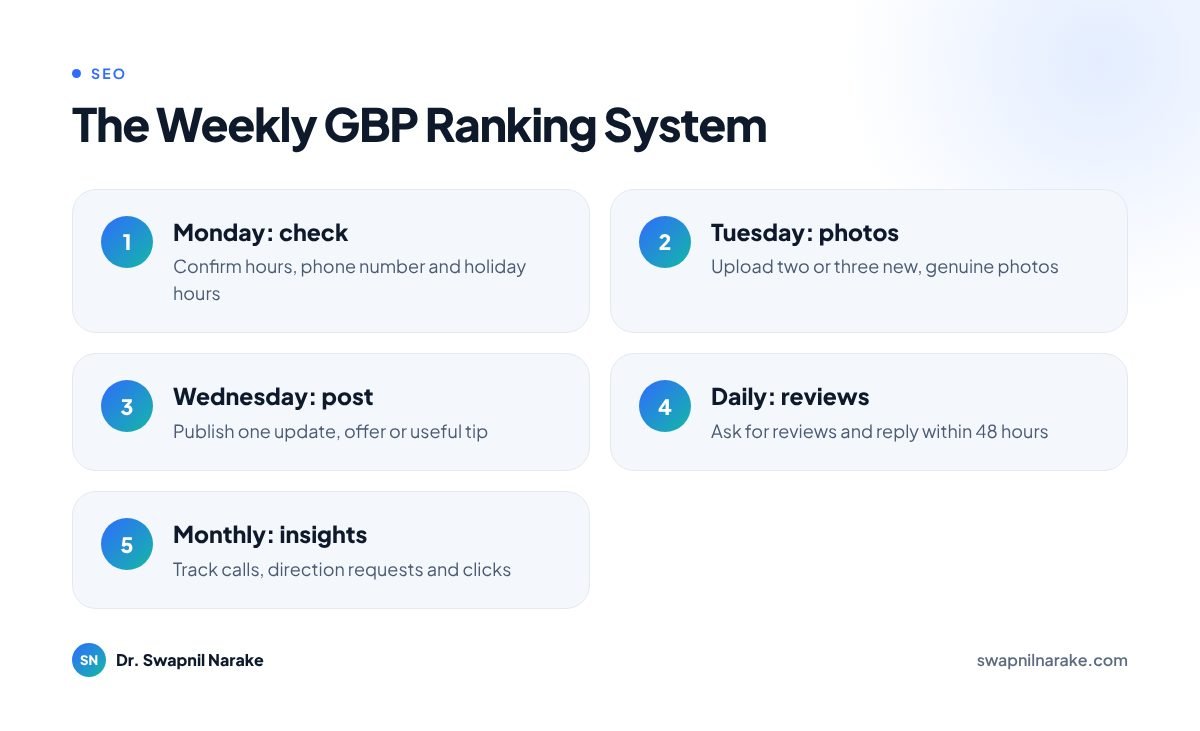
- Monday, check: confirm hours, phone number and any upcoming holiday hours.
- Tuesday, photos: upload two or three new, genuine photos.
- Wednesday, post: publish one update, offer or useful tip.
- Daily, reviews: ask happy customers for reviews and reply to every new one within 24 to 48 hours.
- Monthly, review insights: look at calls, direction requests and website clicks in your profile performance data, and note what changed.
Assign this to one person, put it in the calendar, and let consistency do the work. For a wider view of building routines like this, read how to build a marketing system.
A worked example: a CA office starting from scratch
Here is how a hypothetical two-partner CA office in a Pune suburb could apply everything above in its first month.
- Week 1, foundation: verify the profile, set “Chartered accountant” as the primary category, add services such as GST registration, income tax filing and company incorporation, and match the address exactly to the website footer and letterhead.
- Week 2, visuals and details: add photos of the signboard, office entrance, meeting room and team, set special hours for upcoming holidays and check that the listed number reaches the front desk.
- Week 3, reviews: print a small QR code card for the reception desk and send the review link on WhatsApp after each completed filing, to every client, not just the happiest ones.
- Week 4, posts and website: publish a post on the next tax deadline and create a simple website page answering the ten questions clients ask most often.
From month two onwards, the office simply runs the weekly system. Nothing here is clever; it is the steady, accurate repetition that builds prominence.
Common mistakes that hold rankings back
Most ranking problems come from shortcuts that break Google’s guidelines or from neglecting the basics after set-up.
- Keyword-stuffed business names: they risk suspension and look untrustworthy to customers.
- Wrong or generic categories: “Consultant” or “Store” tells Google very little.
- Duplicate profiles: two listings for the same location split reviews and confuse both customers and Google.
- Buying or bulk-requesting fake reviews: this breaks Google’s policies, and suspicious reviews can be removed.
- Using a virtual office or PO box address: profiles should reflect a real location where you serve customers, or be set up as a service-area business.
- Set and forget: outdated hours and old photos signal neglect.
Which free tools help you track progress?
Three free Google tools cover most of what a small business needs: Google Business Profile’s own performance data, Google Search Console and Google Analytics 4.
- Google Business Profile performance: shows calls, direction requests, website clicks and the search terms people used to find you.
- Google Search Console: shows which searches bring people to your website, including your location page.
- Google Analytics 4: add a tagged link (a UTM parameter) to the website button on your profile, so visits from your profile appear separately in your reports.
Check these once a month, write down two or three numbers in a simple sheet, and look for the trend rather than daily ups and downs.
Key takeaways
- Google ranks local results on relevance, distance and prominence.
- Choose the most specific primary category and keep business details consistent everywhere.
- The four must-haves: quality photos, accurate hours and phone, review responses and regular posts.
- Never stuff keywords into your business name or offer incentives for reviews.
- Top local ranking comes from a weekly system, not a one-time set-up.
FAQs
How long does it take to improve local ranking?
Basic fixes such as categories and accurate details can help within weeks. Building prominence through reviews and mentions usually takes a few months of consistent effort.
Can I pay Google to rank higher in the map results?
No. Organic local rankings cannot be bought. You can run ads that appear in local results, but they are labelled as sponsored and are separate from organic ranking.
Do more reviews always mean a higher ranking?
Reviews help prominence, but they work together with relevance and distance. A steady flow of genuine reviews with thoughtful replies is better than a sudden burst.
Can I rank without a physical shop?
Yes. Businesses that visit customers, such as home tutors or repair services, can set up a service-area profile and hide their address. Relevance and prominence still matter, so keep categories, services and reviews strong.
Should I respond to old reviews too?
Yes, if they have no reply yet. A short, polite response shows current customers that you listen, even if the review is months old.
Improving your Google Business Profile ranking is not about one clever trick; it is about doing the right basic things every week. Build the system once and keep it running. If you would like help with local SEO, or want me for consultation, keynotes or academic engagements, please get in touch.